

Archive

September 2024

Browsing

In the competitive landscape of healthcare, retaining patients is as crucial as acquiring new ones. A key strategy to achieve this is improving patient satisfaction, which not only enhances the patient experience but also solidifies loyalty and trust. Understanding the benefits of patient retention can help healthcare providers refine their practices and maintain a robust patient base.

Enhancing Patient Loyalty

Building Trust and Relationships

One of the primary benefits of patient retention is the cultivation of trust and long-term relationships. Consistent, reliable care encourages patients to remain loyal to their healthcare providers, reducing the likelihood of them seeking services elsewhere. This loyalty is built on personalized care and attention, where patients feel valued and understood.

Increased Referrals and Word-of-Mouth

Satisfied patients are more likely to refer friends and family to their trusted healthcare providers. This organic form of marketing is invaluable, as personal recommendations carry significant weight. Patient retention thus indirectly contributes to new patient acquisition through positive word-of-mouth.

Financial Stability and Growth

Cost Efficiency

Retaining existing patients is often more cost-effective than acquiring new ones. The resources spent on marketing and onboarding new patients can be substantial, whereas maintaining existing relationships requires relatively fewer resources. This cost efficiency translates into better financial stability for healthcare practices.

Consistent Revenue Streams

A stable patient base ensures consistent revenue streams, enabling healthcare providers to plan and allocate resources more effectively. This financial predictability allows for investments in facilities, technology, and staff, further enhancing the quality of care provided.

Quality of Care Improvements

Continuity of Care

Patient retention facilitates continuity of care, where healthcare providers have a comprehensive understanding of a patient’s medical history and needs. This familiarity allows for more accurate diagnoses and personalized treatment plans, ultimately leading to better health outcomes.

Feedback and Improvement

Engaged patients are more likely to provide feedback on their experiences, offering valuable insights into areas of improvement. Implementing effective patient retention strategies can encourage patients to share their thoughts, helping providers enhance their services.

Long-Term Success in Healthcare

Strategic Planning

Patient retention supports long-term success by allowing healthcare providers to plan strategically. A loyal patient base provides data that can inform future services and initiatives, ensuring that healthcare practices remain relevant and responsive to patient needs.

Research and Development

Retained patients can also play a role in research and development efforts. Their ongoing participation in long-term studies, supported by effective strategies for participant retention in long-term clinical trials, can lead to advancements in medical science and improved treatment options.

Conclusion

The benefits of patient retention extend beyond immediate financial gains, impacting the overall quality and sustainability of healthcare services. By focusing on patient satisfaction and implementing strategic retention measures, healthcare providers can ensure a thriving practice that meets the evolving needs of its patient community.

Frequently Asked Questions

  1. How does patient retention impact healthcare providers financially?

Patient retention reduces the costs associated with acquiring new patients and ensures consistent revenue streams, contributing to financial stability and growth.

  1. What role does feedback play in patient retention?

Patient feedback provides insights into service areas that need improvement, helping healthcare providers enhance the quality of care and increase patient satisfaction.

  1. Why is continuity of care important for patient retention?

Continuity of care ensures that healthcare providers have a comprehensive understanding of a patient’s medical history, allowing for more accurate and personalized treatment.
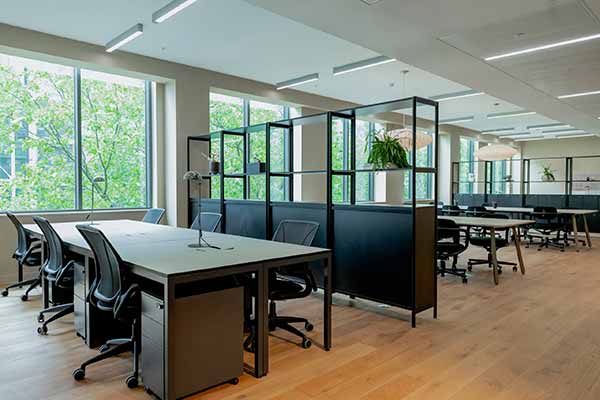

In the rapidly evolving business environment of this day and age, the integration of technology into office design is no longer just a luxury – it’s a necessity. Companies aiming to enhance productivity, improve collaboration, and future-proof their workspaces are increasingly turning to smart office solutions. Whether you’re planning a full office renovation or simply upgrading certain elements, incorporating technology into your fitout can transform the way your team works. Here’s how you can do it effectively.

Smart Desks and Workstations

The modern workspace revolves around flexibility, and smart desks are key to achieving this. Height-adjustable desks, for example, allow employees to alternate between sitting and standing, promoting better posture and overall health. Integrating built-in wireless charging stations and cable management systems can reduce clutter and make for a cleaner, more organised environment. Some smart desks even come equipped with sensors to track usage, offering insights into how space is being utilised.

When choosing furniture, think about how it complements the tech you’re integrating. Ergonomically designed chairs and smart desk solutions go hand-in-hand with a tech-forward approach, offering both comfort and functionality.

Modern Boardroom Technology

The boardroom is the nerve centre for many companies, making it essential to integrate technology that facilitates seamless communication and decision-making. Interactive screens, video conferencing setups, and smart whiteboards can take your boardroom to the next level. These technologies enable remote collaboration and ensure everyone, whether in the office or working remotely, stays on the same page.

Pairing this tech with high-quality modern boardroom tables that feature integrated power and data outlets will make meetings more efficient. Look for tables with built-in charging ports and network access points, which will minimise the need for cumbersome wires and create a sleek, streamlined appearance.

Integrated Audio-Visual Systems

For offices that frequently host presentations or large team meetings, integrating a robust audio-visual (AV) system is crucial. Smart projectors, automated lighting systems, and sound-optimised rooms can elevate the quality of your presentations and create an immersive experience. Automated controls that adjust lighting and sound levels based on the type of meeting taking place can also add a level of sophistication and efficiency to your office fitout.

Consider centralised control panels that allow for easy management of all AV components, ensuring that even less tech-savvy team members can utilise these systems without difficulty.

Smart Office Solutions

Smart Lighting and Climate Control

Gone are the days of manual switches and thermostats. Smart lighting systems allow you to automate and customise lighting levels throughout the day, helping to create an environment that’s conducive to productivity. Motion-sensor lights can save energy, while tunable lighting that adjusts to natural daylight patterns can reduce eye strain and fatigue among employees.

Similarly, smart climate control systems can automatically regulate temperature based on occupancy and time of day, creating a comfortable work environment and cutting down on energy costs.

High-Speed Connectivity

No smart office is complete without robust internet connectivity. High-speed Wi-Fi and integrated Ethernet ports at every workstation ensure that your team can work without interruptions. Cloud-based storage systems and collaboration tools like Microsoft Teams and Slack also rely on dependable internet infrastructure. Make sure your office is equipped with modern routers and a network system capable of handling the demands of today’s digital workspaces.

Security and Access Control

Smart security systems can enhance the safety of your office without creating a cumbersome entry process. Keycard or biometric entry systems allow authorised personnel to access the office or specific rooms without the need for traditional keys. These systems can also keep a record of who enters and exits the office, enhancing security and accountability. Smart cameras with AI-driven analytics can provide real-time monitoring and alerts, ensuring that your office is secure even when no one is around.

Collaborative Spaces with Integrated Technology

Collaboration is key in any modern office, and creating tech-friendly communal areas can foster teamwork and creativity. Consider adding breakout rooms or open-plan collaboration spaces equipped with touchscreen displays, wireless screen-sharing capabilities, and interactive whiteboards. These spaces allow teams to brainstorm, share ideas, and work together on projects in real-time, even if some members are working remotely. Incorporating technology into these areas ensures that creativity and innovation flow freely without any technical hitches slowing things down.

Sustainable Technology Solutions

Sustainability is becoming a top priority for businesses, and technology can help achieve eco-friendly goals. Consider energy-efficient devices and systems, like LED lighting and smart climate control, to reduce the environmental footprint of your office. Additionally, tech solutions such as smart water dispensers and waste management systems can promote sustainability within the workplace. By investing in green technology, you’re not only helping the planet but also saving on long-term operational costs.

Final Thoughts

Incorporating smart office solutions into your fitout isn’t just about staying on-trend – it’s about creating a space that fosters productivity, collaboration, and wellbeing. Whether it’s installing modern boardroom tables with integrated tech features or upgrading your office’s climate control system, smart technology can truly transform the workplace. By embracing these innovations, your office will not only look modern and sleek but will also operate more efficiently, supporting your team to work smarter, not harder.

In today’s healthcare landscape, maintaining HIPAA compliance across multiple locations can be a daunting task. HIPAA compliance software has emerged as a crucial tool for healthcare organizations to streamline their compliance efforts and ensure consistent adherence to regulatory requirements. This article explores how these software solutions help maintain compliance across various facilities and departments.

The Challenge of Multi-Location Compliance

Healthcare organizations with multiple locations face unique challenges in maintaining HIPAA compliance. Each facility may have different processes, systems, and staff, making it difficult to ensure consistent adherence to HIPAA regulations. Moreover, the sheer volume of patient data and the complexity of HIPAA rules can overwhelm even the most diligent healthcare providers.

Enter HIPAA Compliance Software

HIPAA compliance software offers a centralized platform for managing and monitoring compliance across all locations. These solutions provide a range of features designed to simplify the compliance process and reduce the risk of violations.

Centralized Policy Management

One of the key benefits of HIPAA compliance software is its ability to centralize policy management. Organizations can create, update, and distribute policies and procedures across all locations from a single platform. This ensures that all facilities are working with the most up-to-date information and reduces the risk of inconsistencies in policy implementation.

Risk Assessment and Management

HIPAA compliance software often includes tools for conducting risk assessments across multiple locations. These assessments help identify potential vulnerabilities in each facility’s data protection practices. The software can then generate reports and action plans to address these risks, ensuring a consistent approach to risk management across the organization.

Training and Education

Maintaining a well-trained workforce is crucial for HIPAA compliance. Many HIPAA compliance software solutions include training modules that can be easily deployed across multiple locations. These modules often track employee progress and completion, allowing organizations to ensure that all staff members receive the necessary training, regardless of their location.

Incident Tracking and Reporting

In the event of a data breach or other HIPAA violation, quick and consistent reporting is essential. HIPAA compliance software provides tools for tracking and reporting incidents across all locations. This centralized approach ensures that all facilities follow the same protocols for incident response and reporting, reducing the risk of non-compliance.

To further streamline your HIPAA compliance efforts, consider exploring more about HIPAA compliance software and how it can support your organization in managing compliance across multiple locations.

The Benefits of Standardization

By implementing HIPAA compliance software across multiple locations, healthcare organizations can achieve a higher level of standardization in their compliance efforts. This standardization offers several benefits:

  1. Improved efficiency in compliance management
  2. Reduced risk of inconsistencies and oversights
  3. Enhanced ability to demonstrate compliance during audits
  4. Easier identification and resolution of compliance issues

Future Trends in HIPAA Compliance Software

As technology continues to evolve, HIPAA compliance software is likely to incorporate more advanced features. Artificial intelligence and machine learning may play a larger role in identifying potential compliance risks and suggesting proactive measures. Additionally, integration with other healthcare systems and improved mobile accessibility will further enhance the software’s ability to support multi-location compliance efforts.

Conclusion

HIPAA compliance software has become an indispensable tool for healthcare organizations managing compliance across multiple locations. By offering centralized policy management, risk assessment tools, training capabilities, and incident tracking features, these solutions help ensure consistent adherence to HIPAA regulations. For a detailed look at how HIPAA software can simplify your compliance efforts, check out this article. As the healthcare landscape continues to evolve, HIPAA compliance software will play an increasingly important role in protecting patient data and maintaining regulatory compliance.


Private notes are messages or pieces of information that you want to keep secret. They could be passwords, personal thoughts, or important details you need to share with someone. Encryption is one of the best ways to keep your notes private. Encryption turns your message into a code only the right person can unlock. Many apps and websites offer encryption for your notes. When you use encryption, even if someone gets hold of your note, they won’t be able to read it without the key.

  • Choose a secure platform

When you’re looking for a place to store or share your private notes, pick a platform known for security. Some platforms are specially made for sharing secret messages. For example, what is privnote? Privnote is a service that lets you create notes that delete themselves after being read.

  • Enable two-factor authentication

With this feature, you need more than just a password to log in. You might also need to enter a code sent to your phone or use a particular app. Cloud storage can be convenient, but it also means your notes are stored on someone else’s computers. If you use cloud storage for your private notes, ensure the service encrypts your data. For your most sensitive notes, consider keeping them only on your own devices. This could mean storing them on your computer or phone, not in the cloud.

  • Regularly delete old notes

The longer a private note exists, the more likely someone will find it. Get in the habit of deleting notes you no longer need. Some services, like the one mentioned earlier when we asked what a is, automatically delete notes after they’re read.

  • Be cautious with public Wi-Fi

Public Wi-Fi networks, like coffee shops or airports, are often secure. There needs to be more you need to access or send private notes while using public Wi-Fi, use a Virtual Private Network (VPN). A VPN encrypts your internet connection, making it much harder for others to spy on what you’re doing online.

  • Keep your devices secure

Your private notes are only as secure as the devices you use to access them. Ensure your phone, tablet, and computer are protected with strong passwords or biometric locks (like fingerprints or face recognition). Keep your software updated, as updates often include critical security fixes.

  • Be wary of phishing attempts

Phishing is when someone tries to trick you into giving them your login information. They might send an email that looks like it’s from your note-taking app, asking you to log in. Always double-check the sender’s email address, and don’t click on links in suspicious emails. Instead, go directly to the website by typing the address into your browser.

  • Use secure messaging apps

To share private notes with others, consider using secure messaging apps. These apps often use end-to-end encryption, which means only you and the person you’re sending to can read the messages. No one in between, not even the company running the app, can see what you’ve written.

Keeping your private notes truly private takes effort, but protecting your personal information is worth it. Remember, what is privnote used for and other similar services can be helpful tools, but they’re just one part of a broader strategy to keep your information safe. Stay vigilant, keep learning, and always prioritize your privacy in the digital world.